Two-layer parallax scrolling with a player sprite that triggers camera movement. Move with the D-pad. Walk past the threshold and the world scrolls to follow.
Controls
| Button | Action |
|---|---|
| D-Pad | Move the character |
Build & Run
Then open continuous_scroll.sfc in your emulator (Mesen2 recommended).
What You'll Learn
- How SNES background scrolling actually works (it's not moving tiles – it's moving the camera)
- The threshold pattern: only scroll when the player reaches the screen edge
- Parallax scrolling: two layers with independent scroll offsets
- Why scroll register updates must happen during VBlank (and how bgSetScroll's dirty-flag mechanism guarantees it)
Walkthrough
1. Two Layers, Two Speeds
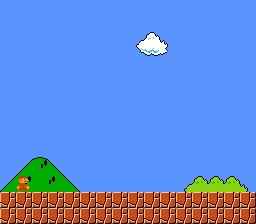
This example uses Mode 1 with two background layers: BG1 is the main scene, BG2 is a distant backdrop. When the camera scrolls, both layers move together (though parallax could use different speeds for a depth illusion). A character sprite overlays the scrolling backgrounds.
Both layers get their own tile data and tilemaps, loaded to different VRAM regions to avoid overlap:
Why palette slot 2 and 4? Each BG palette slot holds 16 colors. Slot 0 starts at CGRAM address 0, slot 2 at address 32, slot 4 at address 64. Using different slots means BG1 and BG2 get independent color palettes.
2. The Threshold Scroll Pattern
The player moves freely on screen. But when they reach a threshold (column 140 going right, column 80 going left), the background starts scrolling and the player gets pushed back:
The player walks right, reaches column 140, the world scrolls right while the player stays at column 140. It looks like the camera is following the character, but it's actually the background moving in the opposite direction.
Why push the player back? Without
player_x -= 1, the player would walk past the threshold and keep going off-screen. The push-back keeps them locked to the threshold while the world scrolls beneath them. This is the same pattern used in Super Mario World's camera system.
3. Scroll Updates via bgSetScroll Dirty Flags
Scroll registers are write-only and take effect immediately. If you write them during active display (while the PPU is drawing), you'll get a visible tear – the top half of the screen shows the old scroll position, the bottom half shows the new one.
This example calls bgSetScroll() from the main loop, which does NOT write to the PPU directly. Instead, it stores the new scroll values and sets a dirty flag. The NMI handler (triggered at VBlank) checks the dirty flags and writes the actual scroll registers at a safe time:
This deferred-write mechanism ensures glitch-free scrolling without needing a custom VBlank callback. The initial scroll values are also set before setScreenOn() so the first visible frame shows the correct position.
4. Input Reading
The example reads the joypad directly from hardware registers after waiting for the auto-joypad read to complete:
5. The Game State Struct
All game variables live in one struct:
Why a struct instead of separate variables? The OpenSNES compiler has a known quirk: separate
static u16variables can generate broken code for some access patterns, while struct members work correctly. Using a struct also keeps related state together, which makes the code easier to follow.
</blockquote>
Tips & Tricks
- Player gets stuck at the edge? Check your threshold values. If
SCROLL_THRESHOLD_RIGHTis too high (close to 256), the player can walk off-screen before scrolling kicks in. - Want true parallax? Change BG2's scroll increment to be slower than BG1's.
bg2_scroll_x += 1every other frame whilebg1_scroll_x += 1every frame. The speed difference creates the depth illusion. - Sprite disappears at the left edge? The SNES uses 9-bit X coordinates for sprites. Values below 0 wrap to 256+, which is off-screen. Clamp
player_xto a minimum of 0.
Go Further
- Add tile streaming: Right now the tilemap is static. For larger worlds, you'd upload new tile columns as the camera scrolls. See LikeMario for a working implementation.
- Add vertical scrolling: Same pattern, but with Y thresholds and
bg_scroll_y. Vertical scrolling is slightly trickier because the SNES tilemap wraps every 32 rows. - Add animation: Use different sprite tiles based on direction. Tile 0 for right, tile 1 for left, advance every few frames for a walk cycle.
- Next example: LikeMario – full platformer with gravity, collision, and tile streaming.
Under the Hood: The Build
The Makefile
Why These Modules?
| Module | Why it's here |
|---|---|
console | PPU setup, NMI handler, WaitForVBlank() |
sprite | OAM buffer for the player character sprite |
input | Joypad buffer symbols needed by NMI handler |
background | bgSetMapPtr(), bgSetScroll(), bgInitTileSet() with dirty-flag deferred writes |
dma | dmaCopyVram(), dmaCopyCGram() for bulk asset transfers, plus OAM DMA in NMI |
Technical Reference
| Register | Address | Role in this example |
|---|---|---|
| BGMODE | $2105 | Mode 1 (two 4bpp layers + one 2bpp) |
| BG1SC | $2107 | BG1 tilemap at $0000 |
| BG2SC | $2108 | BG2 tilemap at $0800 |
| BG1HOFS | $210D | BG1 horizontal scroll (via bgSetScroll) |
| BG2HOFS | $210F | BG2 horizontal scroll |
| TM | $212C | Enable OBJ + BG2 + BG1 |
| INIDISP | $2100 | Force blank / brightness control |
Files
| File | What's in it |
|---|---|
main.c | Game loop, scrolling logic, input handling (~265 lines) |
data.asm | BG1/BG2 tiles, palettes, tilemaps, character sprite |
Makefile | LIB_MODULES := console sprite input background dma |
Credits
- Original: odelot (PVSnesLib example)
- Sprite: Calciumtrice (CC-BY 3.0)
- Backgrounds inspired by Streets of Rage 2
