 |
OpenSNES
Modern Open-Source SNES Development SDK
|
|
OpenSNES
Modern Open-Source SNES Development SDK
|
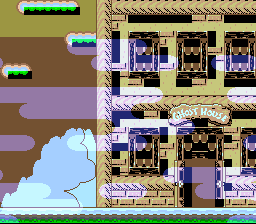
examples/color/transparency: a sub-screen layer blended over the main screen by the colour-math unit.
This tutorial covers the SNES colour-math unit: the per-pixel hardware that adds or subtracts the colour of one layer onto another, with an optional half-divide step. It's how every SNES game does transparency, shadows, fades to black/white, underwater tints, lighting effects, and additive overlays (think clouds, mist, explosions, magic spells).
It assumes you have read the Graphics and Window tutorials. The window section is the natural pair — windows define where colour math applies, colour math defines what to blend.
Every pixel that the SNES PPU draws goes through a per-pixel pipeline that, late in rendering, can add or subtract a second colour onto the first colour. The two colours come from:
The math operation:
| Op | Formula | Use |
|---|---|---|
| COLORMATH_ADD | out = main + source | Brighten, additive overlay (clouds, fire, sparkles) |
| COLORMATH_SUB | out = main - source | Darken, fade-to-black, underwater |
| + half | out = (main ± source) / 2 | True 50 % blend (transparency) |
A "half" flag (colorMathSetHalf(1)) divides the result by 2 — the canonical 50 % transparency effect. Without half, addition saturates (values clip at 31 per channel) and subtraction can clip to zero.
A common stumbling block: the same layer can be on both main and sub screen. They aren't physical layers; they're gates.
For a simple "BG2 is 50 % transparent over BG1" effect:
This is the canonical pattern. For more advanced layouts (BG2 on sub only, BG1 on main, math gate on a window region), the gates flex independently.
Cloud layer (BG2) blended additively over a landscape (BG1):
The non-obvious bit: colorMathSetLayers(layer) selects which destination layer participates in the math, not which source. The source is always determined by colorMathSetSource (sub screen or fixed colour); the layer mask says "for pixels on BG1 (or BG2, or OBJ), allow this pixel to be modified by math".
A typical "let everything blend" setup would be colorMathSetLayers(COLORMATH_ALL) — but more often you restrict it to a specific layer to control which surfaces look transparent.
Fixed-colour mode subtracts (or adds) a uniform RGB value across the whole frame, ignoring the sub screen. Animate the fixed colour over several frames to fade in or out.
The lib/include/snes/video.h setBrightness() is a different mechanism — it scales every channel uniformly by a 4-bit factor via INIDISP, and is the right tool for "global brightness". Colour math gives finer control: per-layer fades, asymmetric R/G/B fades for underwater tints, etc.
Colour math can be restricted to a window region — applying only inside or only outside one of the windows. This is the bridge between the Window tutorial and this one:
colorMathSetCondition(condition) writes CGWSEL bits 5-4, the region where colour math is allowed. The four constants:
| COLORMATH_* | Math fires when… |
|---|---|
| _ALWAYS | always (default — full screen) |
| _INSIDE | pixel is inside the window-gated math area |
| _OUTSIDE | pixel is outside it |
| _NEVER | never (use to disable math without unwinding all enables) |
The other half of CGWSEL, bits 7-6, uses the same four regions for a different effect: it clips the main screen's colours to black before the math (never / outside / inside / always). There is no sub-screen twin of the math region — see anomie's register doc ("cc = Clip colors to black before math, mm = Prevent color math") and snesdev-wiki. The lib has no function for the clip bits yet.
| Function | Purpose |
|---|---|
| colorMathInit() | Reset all colour-math registers to "off". Call before configuring a new scene. |
| colorMathSetLayers(layers) | Bitmask of which layers' pixels can be modified by math (LAYER_BG1, …, LAYER_OBJ, COLORMATH_BACKDROP, COLORMATH_ALL). |
| colorMathDisable(layers) | Take layers out of the per-pixel math gate. |
| colorMathSetOp(op) | COLORMATH_ADD or COLORMATH_SUB. |
| colorMathSetHalf(half) | 0 = don't divide result, 1 = divide by 2 (true 50 % blend). |
| colorMathSetSource(src) | COLORMATH_SRC_SUBSCREEN or COLORMATH_SRC_FIXED. |
| colorMathSetFixedColor(r, g, b) | Set the fixed-colour value (5-bit per channel). Used when source is _FIXED. |
| colorMathSetCondition(condition) | Window region where math is allowed: _ALWAYS / _INSIDE / _OUTSIDE / _NEVER (CGWSEL bits 5-4). |
| colorMathSetChannel(channel, intensity) | Set one channel of the fixed colour (COLDATA_RED, COLDATA_GREEN, COLDATA_BLUE, OR-able) to 0-31, leaving the others as they are. |
| colorMathSetBrightness(level) | The fixed colour as a grey of 0-31, for fades: with COLORMATH_ADD it fades toward white, with COLORMATH_SUB toward black. |
| colorMathTransparency50(layers) | One call for a 50 % blend of layers with the sub screen (add, halve, sub-screen source). Put the layer to show through on the sub screen with setSubScreen(). |
| colorMathSetDirectColor(enable) | 8bpp layers read each pixel byte as a colour instead of a CGRAM index — see examples/color/direct_color. |
The simplest blend pattern. BG1 (main) shows a 4 bpp landscape; BG3 (main + sub) shows 2 bpp scrolling clouds. Colour math is set to add with half disabled (saturating add), applied to BG1 and the backdrop. The clouds brighten what's underneath without dimming themselves — characteristic of additive blending.
The example uses Mode 1 with BG3 priority high (so the 2 bpp cloud layer renders above BG1). It uses bare-metal REG_CGWSEL / REG_CGADSUB writes for byte-perfect parity with the PVSnesLib original, but the lib's helpers cover the same configuration.
Combines colour math with a window-gated math area. Inside the window, BG1 is half-blended with BG2 (true transparency); outside, BG1 is fully opaque. The example also uses HDMA to animate the window shape — see the Window and HDMA tutorials for those sides.
This is the canonical demonstration of how three SNES PPU subsystems (window, colour math, HDMA) compose: window says where, colour math says what to blend, HDMA animates the shape per scanline.
Putting a layer only on the sub screen and not on the main screen does not show that layer through the colour math. The main screen must contain something for the math to modify; the sub screen pixel contributes only as the source of the math operation, not as a visible layer.
For "BG2 visible only inside a window", put BG2 on main + sub, set window mask to BG2, and gate colour math accordingly. The "sub only" configuration is for cases where BG2's pixel shouldn't render at all unless math reads it.
The lib's colorMathSetSource sets the source register CGWSEL bit 1. At the bare-metal level: bit 1 = 0 → fixed colour, bit 1 = 1 → sub screen. The lib was historically inverted; commit history (per KNOWN_LIMITATIONS.md and lib/source/colormath.c) records the fix. Use the lib helper, not bare-metal writes. If you do go bare metal, verify polarity against the SNES PPU register reference, not against intuition.
If your transparency looks "too bright" or "too washed-out", you probably forgot half. If your additive glow looks "too washed out and hits white quickly", you probably enabled half.
COLORMATH_BACKDROP lets you blend onto the backdrop colour (CGRAM[0]) in regions where no BG/OBJ layer covers a pixel. This is useful for tinting the gameplay area (the "underwater" scene) where some pixels are backdrop-coloured.
If you use it: remember the backdrop is a single colour, so the math applies uniformly across all backdrop pixels. To tint only some backdrop region, use a window gate.
The pipeline order matters: per-pixel windowing decides whether the layer renders, then colour math runs on the surviving pixels. A windowed-out pixel doesn't reach the math stage. This is usually what you want — but it means you cannot use colour math to recover a pixel that windowing already masked.
To fade out a region while keeping the layer visible underneath (for example, a vignetting effect): use the window-gated math area (COLORMATH_INSIDE / COLORMATH_OUTSIDE), not the layer window mask.
When LAYER_OBJ is enabled, colour math applies only to sprite pixels that use OBJ palettes 4–7 (the upper half). Sprites in OBJ palettes 0–3 always render opaque, regardless of the math configuration. A common "why doesn't my sprite blend?" cause.
This is a SNES PPU rule, not an OpenSNES choice — the sprite needs to be in a "math-eligible" palette to participate.
Colour math runs in PPU hardware, not on the CPU, so the per-pixel blend is free. The cost lives in the configuration writes:
Colour math is one of the cheapest large-visible-impact effects on the SNES. The discipline is configuring it correctly, not avoiding it.
 1.16.1