 |
OpenSNES
Modern Open-Source SNES Development SDK
|
|
OpenSNES
Modern Open-Source SNES Development SDK
|
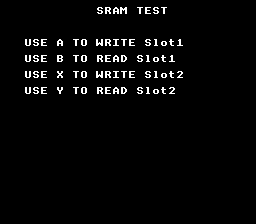
How to save and load game data using the SNES cartridge SRAM (Static RAM). The SRAM is battery-backed – data persists even when the console is powered off. This is how classic SNES games like Zelda and Final Fantasy save progress.
Read text/print_string first (console setup, text display).
| Button | Action |
|---|---|
| A | Write test data to Slot 1 |
| B | Read and display Slot 1 |
| X | Write test data to Slot 2 |
| Y | Read and display Slot 2 |
Then open save_game.sfc in your emulator (Mesen2 recommended).
The structure is 8 bytes. In a real game, this would hold player position, inventory, level progress, etc.
sramSaveOffset() copies SAVE_SIZE bytes from RAM to SRAM at the given offset. Multiple save slots use different offsets (Slot 0 at offset 0, Slot 1 at offset 8, etc.).
sramLoadOffset() copies bytes back from SRAM into a RAM structure. The loaded values are then displayed as hex on screen using textPrintHex().
USE_SRAM sets the ROM header flag telling the emulator (or real hardware) that the cartridge has battery-backed SRAM. SRAM_SIZE = 3 means 8 KB (2^3 = 8 KB).
The example uses the text system on BG1 in Mode 0 (2bpp):
After each save/load operation, textPrintAt() updates the on-screen feedback and textFlush() sends the updated text buffer to VRAM.
In LoROM mode, SRAM is mapped at $70:0000-$71:FFFF (up to 64 KB, though most cartridges have 8 KB). In HiROM mode, it appears at $20:6000-$3F:7FFF. The sramSaveOffset() and sramLoadOffset() functions handle the addressing – you just provide a byte offset.
Save slots are simply offsets into SRAM. With 8 KB of SRAM and 8-byte saves, you could theoretically have 1024 slots. Real games use 3-4 slots with larger structures (100-500 bytes for RPG save states).
This example does not validate saves. A real game should store a checksum alongside the save data to detect corrupted SRAM (weak battery, first boot with uninitialized RAM, etc.). A simple XOR or CRC-8 of the save bytes suffices.
On real SNES hardware, a CR2032 lithium battery in the cartridge powers the SRAM when the console is off. Batteries last 15-25 years. In emulators, the SRAM is saved to a .srm file on disk.
| File | Purpose |
|---|---|
| main.c | Save/load logic, text display, input handling |
| Makefile | USE_SRAM := 1, LIB_MODULES := console dma text background sprite input |
console, dma, text, background, sprite, input (LIB_MODULES in the Makefile).
 1.16.1