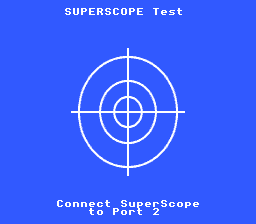
Screenshot
Light gun detection, calibration via PPU H/V counters, and fire tracking with a red dot sprite.
Controls
| Input | Action |
| Fire (trigger) | Calibrate aim / mark hit position |
| Pause | Return to calibration screen |
| Cursor | Advance to ready state |
Build & Run
cd $OPENSNES_HOME
make -C examples/input/superscope
Then open superscope.sfc in your emulator (Mesen2 recommended). Enable Super Scope in Mesen2 Input settings, port 2.
What You'll Learn
- How the SNES Super Scope communicates hit position via PPU H/V counters
- The detect/calibrate/ready state machine pattern for light guns
- Using OBJSEL() to configure sprite sizes and VRAM base in one readable macro
- Direct OAM buffer writes for fast single-sprite updates
- 2bpp background graphics on Mode 0 with 4-color palettes
Walkthrough
1. Initialization
void consoleInit(void)
Initialize SNES hardware.
#define BG_MODE0
Definition video.h:34
void setMode(u8 mode, u8 flags)
Set background mode.
Mode 0 gives four 2bpp BG layers. We use BG1 for text and BG2 for the calibration target image.
2. Text System (BG1)
void bgSetMapPtr(u8 bg, u16 vramAddr, u8 mapSize)
Set background tilemap address and size.
void bgSetGfxPtr(u8 bg, u16 vramAddr)
Set background tile graphics address.
#define BG_MAP_32x32
Definition background.h:30
void textLoadFont(u16 vram_addr)
Load font tiles to VRAM.
#define TEXT_DEFAULT_FONT_TILE
Default first font tile (zero — font occupies tiles 0-95).
Definition text.h:48
#define TEXT_DEFAULT_PALETTE
Default palette slot (palette 0).
Definition text.h:50
void textInit(u16 tilemap_addr, u16 font_tile, u8 palette)
Initialize the text rendering system.
#define TEXT_DEFAULT_TILEMAP_ADDR
Default tilemap WORD address — 32×32 tilemap at VRAM word $3800.
Definition text.h:46
The built-in 2bpp font is loaded to VRAM $0000. BG1's tilemap sits at $3800 to avoid conflicts with BG2 graphics.
3. Calibration Background (BG2)
void dmaCopyVram(const u8 *source, u16 vramAddr, u16 size)
Copy data to VRAM (PVSnesLib compatible).
The crosshair target image is a 256x224 background. Tiles at $1000, tilemap at $2000.
4. Sprites
#define REG_OBJSEL
Object (sprite) size and base (W).
Definition registers.h:52
#define OBJ_SIZE16_L32
Definition sprite.h:55
#define OBJSEL(size, vram_addr)
Build OBJSEL register value from size constant + VRAM base address.
Definition sprite.h:75
The OBJSEL() macro replaces the cryptic 0x62 with a readable size + base address. OBJ_SIZE16_L32 means small=16x16, large=32x32. The sprite sheet has the red dot at tile 0x80 (pixel position 0,64 in the 128-wide sheet).
5. Direct OAM Setup
u8 oamMemory[]
Hardware OAM buffer (544 bytes at $7E:0300).
volatile u8 oam_update_flag
OAM DMA trigger flag.
Writing directly to oamMemory[] avoids the call and argument pushes of oamSet(). For a single sprite updated occasionally, this is clean and fast.
6. State Machine
The example uses three states:
The fire_armed flag prevents the calibration fire from immediately re-triggering in the next state (debouncing).
Tips & Tricks
- 2bpp quantization: When converting images with mostly one color (blue background), the converter may lose minority colors (white crosshair lines). Pre-process the PNG with a fixed indexed palette (e.g. via PIL quantize()) to control which colors are preserved.
- Sprite tile numbering: In a 128px-wide sprite sheet with 16x16 sprites, tile numbers follow row * 32 + col * 2. opensnes-sprite inspect reports the block and tile counts; gfx4snes --sprite-map (the legacy converter, still shipped) prints the full tile map to find a tile number.
- OBJSEL macro: Instead of memorizing that 0x62 means "16/32 sizes at VRAM $4000", use OBJSEL(OBJ_SIZE16_L32, 0x4000).
- Mesen2 Super Scope setup: In Input settings, assign Super Scope to port 2. Map Fire and Pause to keyboard keys. The scope cursor must be over the emulator window for H/V counters to register.
Under the Hood: The Build
TARGET := superscope.sfc
USE_LIB := 1
LIB_MODULES := console input sprite dma text background
Modules Used
console, input, sprite, dma, text, background (LIB_MODULES in the Makefile).
Technical Reference
| Register | Address | Role in this example |
| OBJSEL | $2101 | Sprite size + tile base address |
| CGADD | $2121 | Palette write address |
| CGDATA | $2122 | Palette color data (RGB555 LE) |
| TM | $212C | Main screen layer enable |
| OPHCT | $213C | PPU horizontal counter (Super Scope X) |
| OPVCT | $213D | PPU vertical counter (Super Scope Y) |
Files
| File | What's in it |
| main.c | State machine, sprite control, text display |
| res/*.png.toml | the import settings of the target picture (opensnes-tileset, 2bpp) and the sprite sheet (opensnes-sprite, 32-pixel blocks, 48 colours); the build converts and links them |
| res/ | Pre-converted graphics (.pic, .pal, .map) and source PNGs |
| Makefile | LIB_MODULES := console input sprite dma text background |

 1.16.1