What This Example Shows
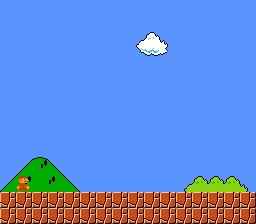
How to display a single 32x32 pixel sprite on screen using the SNES Object Attribute Memory (OAM). This is the simplest possible sprite program – no animation, no input, just one sprite at the center of the screen.
Prerequisites
Read text/hello_world first – it covers consoleInit(), VRAM, and the PPU basics.
Controls
No interactive controls. A static sprite is displayed at the center of the screen.
Build & Run
Then open simple_sprite.sfc in your emulator (Mesen2 recommended).
How It Works
1. Load sprite graphics into VRAM
Sprite tiles go to a different VRAM region than background tiles. Here we load them at word address $2100. The SNES has a shared 64 KB VRAM – backgrounds and sprites coexist by using non-overlapping address ranges.
2. Load the sprite palette
CGRAM (Color Generator RAM) holds 256 entries. The first 128 are for backgrounds, the last 128 are for sprites. Offset 128 = first sprite palette (palette 0 in sprite terms). Each palette is 16 colors (32 bytes in 15-bit SNES format).
3. Configure OBJ size
The SNES supports two sprite sizes simultaneously: "small" and "large". Here we use 8x8 small / 32x32 large. The second parameter (1) sets the name base – the VRAM region where sprite tiles start ($2000 in word addressing).
4. Place the sprite
oamSet() configures OAM entry 0:
- Position: (112, 96) – roughly centered on the 256x224 screen
- Tile number:
0x0010– calculated as(0x2100 - 0x2000) / 16 - Palette: 0 (first sprite palette)
- Priority: 3 (in front of all backgrounds)
oamSetSize() selects the "large" size (32x32) for this sprite. Visibility is controlled by Y position; oamSet placed it on-screen.
5. Enable display
Mode 1 is used but we only enable sprites (LAYER_OBJ) on the main screen – no backgrounds needed for this demo.
SNES Concepts
OAM (Object Attribute Memory)
The SNES has 128 sprite entries in OAM, each with:
- X/Y position (9-bit X, 8-bit Y)
- Tile number (9 bits – selects which VRAM tiles to display)
- Palette (3 bits – selects from 8 sprite palettes)
- Priority (2 bits – controls layering with backgrounds)
- Horizontal/vertical flip flags
Plus 32 bytes of "high table" storing the X position MSB and size-select bit for each sprite (2 bits per sprite, packed 4 per byte).
CGRAM Split
Colors 0-127 are for backgrounds, colors 128-255 are for sprites. Sprite palette 0 starts at CGRAM offset 128, palette 1 at 144, and so on. Each palette holds 16 colors (32 bytes).
Name Base
The VRAM word address where the PPU starts looking for sprite tiles. Set via oamInit() or register $2101 (OBJSEL). The tile number in each OAM entry is an offset from this base.
Project Structure
| File | Purpose |
|---|---|
main.c | Sprite loading, OAM setup, display configuration |
data.asm | Sprite tile data and palette via .INCBIN |
res/sprite32.png | Source 32x32 sprite image |
Makefile | LIB_MODULES := console dma sprite |
Going Further
- Move the sprite: Add
padHeld()input reading and update the X/Y position in the main loop withoamSet(). - Change the palette: Write different colors to CGRAM offset 128 and see the sprite change appearance without reloading tiles.
- Explore related examples:
sprites/animated_sprite– Add movement and animation framessprites/dynamic_sprite– Stream sprite tiles to VRAM each frame
