Loading...
Searching...
No Matches
LikeMario

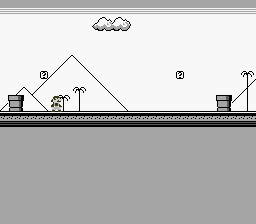
‍A side-scrolling platformer with gravity, tile collision, and a camera that follows the player across a world bigger than the screen. This is the real deal.
Controls

Button Action
D-Pad Left/Right Walk
A Jump (hold Up + A for higher jump)

Build & Run

cd $OPENSNES_HOME
make -C examples/games/likemario

Then open likemario.sfc in your emulator (Mesen2 recommended).

What You'll Learn

  • How tile streaming works — loading new map columns into VRAM as the camera scrolls
  • Fixed-point physics: gravity, acceleration, and sub-pixel movement on a CPU with no multiply
  • Tile-based collision detection with O(1) lookups (no sprite-to-sprite checks)
  • The double-buffer pattern: stage data in RAM during active display, flush to VRAM during VBlank
  • Why the camera position and the scroll register are two different things

Walkthrough

1. The World Is Bigger Than the Screen

The SNES screen is 256 pixels wide — 32 tiles. But the LikeMario map is hundreds of tiles wide. The PPU's tilemap is only 32x32 entries, so you can't load the entire world at once. Instead, the game streams new tile columns into VRAM as the camera scrolls.

Think of the tilemap as a circular buffer. As the camera moves right, the leftmost column scrolls off-screen. That column's VRAM slot gets overwritten with the next column from the map. The player never sees the swap because it happens off-screen.

2. The VRAM Layout

#define VRAM_SPR_LARGE 0x0000 // Sprite graphics
#define VRAM_SPR_SMALL 0x1000 // Sprite graphics (small)
#define VRAM_BG_TILES 0x2000 // Background tileset
#define VRAM_BG_MAP 0x6800 // Background tilemap (32x32)

The tileset (the pixel art for every unique tile) lives at $2000. The tilemap (which tile goes where) lives at $6800. Sprites get $0000-$1FFF. This layout avoids overlaps and leaves room for the 32x32 tilemap to wrap around.

3. Streaming: The Column Pipeline

Streaming happens in three stages, split across the frame:

During active display (CPU is free, PPU is drawing):

/* Fill col_buffer[32] from map data — RAM only, no VRAM access */
for (row = 0; row < map_height; row++) {
}
col_pending = 1; /* Flag: "I have data ready" */
}
static u16 bx
Definition main.c:159
static u16 col_buffer[32]
Column tile buffer for deferred VRAM streaming.
Definition main.c:178
static u16 map_height
Definition main.c:139
static void map_prepare_column(u16 map_col, u16 vram_col)
Buffer a map column for deferred VRAM write (prepare phase).
Definition main.c:302
static u16 * map_row_ptrs[32]
Precomputed row pointers into map_data for fast tile lookup.
Definition main.c:150
static u8 col_pending
Definition main.c:180
unsigned short u16
16-bit unsigned integer (0 to 65535)
Definition types.h:52

During VBlank (PPU is idle, VRAM is writable):

static void map_flush_column(void) {
if (!col_pending) return;
REG_VMAIN = 0x81; /* Auto-increment vertically (down the column) */
/* Write col_buffer to VRAM */
}
static void map_flush_column(void)
Flush the buffered column to VRAM via DMA (flush phase).
Definition main.c:330
#define REG_VMAIN
VRAM address increment mode (W)
Definition registers.h:112

The decision logic (every frame):

static void map_update(void) {
tile_x = camera_x >> 3;
if (tile_x != last_tile_x) {
/* Camera moved — stream the column 32 tiles ahead */
new_col = tile_x + 32;
}
}
static s16 last_tile_x
Definition main.c:153
static s16 camera_x
Definition main.c:152
static void map_update(void)
Check if the camera has scrolled to a new tile column and prepare it.
Definition main.c:362

Why +32, not +31? The screen shows tiles 0-31, but tile 32 is partially visible at the right edge (the camera rarely sits on an exact tile boundary). Without that extra column, you'd see a blank strip flickering at the right side during scrolling. This was a bug in the original port that took a while to track down.

4. Fixed-Point Physics

The 65816 has no multiply instruction and runs at 3.58 MHz. You can't afford floating-point anything. Instead, positions and velocities use 8-bit fixed-point: the high byte is the pixel position, the low byte is the fractional part (1/256th of a pixel).

static s16 mario_xvel; /* Velocity: units of 1/256 pixel per frame */
static u8 mario_xfrac; /* Fractional pixel accumulator */
/* Apply velocity */
mario_x += asr8(new_frac); /* Integer part → pixel position */
mario_xfrac = new_frac & 0xFF; /* Fractional part → carry forward */
static s16 mario_x
Definition main.c:155
static s16 mario_xvel
Definition main.c:159
static s16 asr8(s16 val)
Arithmetic right shift by 8 bits (extract integer part of 8.8 fixed-point).
Definition main.c:479
static u8 mario_xfrac
Definition main.c:157
signed short s16
16-bit signed integer (-32768 to 32767)
Definition types.h:49
unsigned char u8
8-bit unsigned integer (0 to 255)
Definition types.h:46

At 60fps, a velocity of 0x0140 (= 1.25 pixels/frame) moves Mario at 75 pixels per second. The fractional accumulator means Mario can move at speeds finer than 1 pixel per frame — essential for smooth deceleration.

What's asr8()? Arithmetic shift right by 8 — effectively dividing by 256 while preserving the sign. The compiler's >> operator uses logical shift (LSR), which fills the top bit with 0 instead of the sign bit. For negative velocities (moving left), this gives the wrong answer. asr8() is a workaround that inverts, shifts, and inverts back.

5. Gravity in Two Lines

mario_yvel += GRAVITY; /* Accelerate downward every frame */
if (mario_yvel > 0x0400) mario_yvel = 0x0400; /* Terminal velocity */
static s16 mario_yvel
Definition main.c:160
#define GRAVITY
Gravity acceleration in 8.8 fixed-point units per frame.
Definition main.c:101

GRAVITY = 48 (in 1/256 pixel/frame units). That's roughly 0.19 pixels/frame of acceleration — feels like a Mario game because these constants were tuned by PVSnesLib to match the original's feel.

Jumping sets a negative Y velocity:

if (padPressed(0) & KEY_A) {
if (padHeld(0) & KEY_UP)
mario_yvel = -MARIO_HIJUMPING; /* -0x0594: high jump */
else
mario_yvel = -MARIO_JUMPING; /* -0x0394: normal jump */
}
#define MARIO_HIJUMPING
High jump initial upward velocity (when holding UP during jump)
Definition main.c:109
#define MARIO_JUMPING
Normal jump initial upward velocity in 8.8 fixed-point.
Definition main.c:107
#define KEY_A
Definition input.h:81
#define KEY_UP
Definition input.h:75
u16 padHeld(u8 pad)
Get buttons currently held.
u16 padPressed(u8 pad)
Get buttons pressed this frame.

6. Tile-Based Collision

No bounding boxes, no sprite lists. The world is made of tiles, and collision is a lookup:

tx = px >> 3;
ty = py >> 3;
return T_SOLID; /* Out of bounds = wall */
tile_id = map_row_ptrs[ty][tx] & 0x03FF; /* Mask off flip/palette bits */
}
static u16 px
Definition main.c:166
static u16 map_get_tile_prop(s16 px, s16 py)
Look up the collision property of the tile at pixel coordinates.
Definition main.c:199
static u16 * tile_props
Definition main.c:141
static u16 map_width
Definition main.c:138
#define T_SOLID
Solid tile (blocks movement)
Definition map.h:57

map_row_ptrs[] is precomputed at load time — one pointer per row, so looking up a tile is just an array index. No multiplication, no searching. O(1).

To check if Mario is standing on ground, test two points at his feet:

if (left == T_SOLID || right == T_SOLID) {
mario_y = ((mario_y + 16) & 0xFFF8) - 16; /* Snap to tile grid */
}
static u8 mario_action
Definition main.c:161
static s16 mario_y
Definition main.c:156
#define ACT_STAND
Definition map.h:93

Two points, not one, because Mario is 16 pixels wide. Testing only the center would let him hang off ledges with half his body in mid-air.

7. The Main Loop

One frame, one iteration. Game logic runs during active display, VRAM writes during VBlank:

while (1) {
/* Active display — game logic (no VRAM access) */
map_update(); /* Stage column in RAM */
/* VBlank — hardware updates */
map_flush_column(); /* Write staged column to VRAM */
bgSetScroll(0, camera_x, 0); /* Update scroll register */
/* NMI handler auto-flushes the dynamic sprite engine
* (end-frame + VRAM tile queue) — no manual calls needed. */
}
void bgSetScroll(u8 bg, u16 x, u16 y)
Set background scroll position.
void WaitForVBlank(void)
Wait for next VBlank period.
static void mario_update_camera(void)
Update camera to follow Mario and position the sprite on screen.
Definition main.c:658
static void mario_collide_vertical(void)
Check vertical tile collisions (ground landing and ceiling bonk).
Definition main.c:519
static void mario_apply_physics(void)
Apply gravity and integrate velocity into position.
Definition main.c:493
static void mario_animate(void)
Update Mario's sprite animation frame based on current action.
Definition main.c:628
static void mario_collide_horizontal(void)
Check horizontal tile collisions (wall sliding).
Definition main.c:560
static void mario_clamp_and_transition(void)
Clamp Mario to world boundaries and handle action state transitions.
Definition main.c:593
static void mario_handle_input(void)
Process D-pad and button input for Mario's movement.
Definition main.c:424

The split is strict: everything above WaitForVBlank() touches only RAM. Everything below it writes to hardware. Break this rule and you get visual corruption.


Tips & Tricks

  • Mario falls through the floor? Check your collision points. If mario_y + 16 overshoots by even one pixel, the tile lookup returns the row below the floor — empty space — and Mario keeps falling.
  • Tiles missing at the right edge? Your streaming offset is wrong. It must be tile_x + 32, not tile_x + 31. The 33rd tile is partially visible.
  • Mario slides after stopping? That's intentional — deceleration. The velocity decreases by a fixed amount each frame until it reaches zero. Remove the deceleration code and Mario stops instantly (feels stiff).
  • Scrolling tears or flickers? bgSetScroll() must happen during VBlank. If it's called during active display, the top and bottom halves of the screen scroll by different amounts for one frame.

Go Further

  • Add enemies: Use a second sprite with its own collision box. Check overlap with Mario each frame. Start simple — a Goomba that walks left until it hits a wall.
  • Add coins: Mark certain tiles as collectible in tile_props[]. When Mario touches one, replace the tilemap entry with an empty tile and increment a counter.
  • Add sound: The assets include mariojump.brr (a jump sound effect) and overworld.it (music). Wire them up with SNESMOD — see SNESMOD Music for the pattern.
  • Study the physics: Change GRAVITY, MARIO_ACCEL, and MARIO_JUMPING. Small tweaks completely change how the game feels. This is how real platformers are tuned.

Under the Hood: The Build

The Makefile

TARGET := likemario.sfc
CSRC := main.c
ASMSRC := data.asm
USE_LIB := 1
LIB_MODULES := console sprite sprite_dynamic sprite_lut dma input background

Asset Conversion with gfx4snes

The Makefile includes custom rules for two different asset types:

# Background tiles: 8x8, 4bpp, 16 colors
res/tiles.pic res/tiles.pal: res/tiles.png
$(GFX4SNES) -s 8 -o 16 -u 16 -p -m -i $<
# Mario sprites: 16x16, 4bpp, 16 colors
res/mario_sprite.pic res/mario_sprite.pal: res/mario_sprite.png
$(GFX4SNES) -s 16 -o 16 -u 16 -p -i $<
Flag Meaning
-s 8 / -s 16 Tile size (8x8 for backgrounds, 16x16 for sprites)
-o 16 Palette offset: start at color 16 in CGRAM
-u 16 Use up to 16 unique colors
-p Generate palette file (.pal)
-m Generate tilemap file (.map) — only for backgrounds
-i Input file (PNG format, the default)

Why So Many Modules?

Module Why it's here
console PPU init, NMI handler, WaitForVBlank()
sprite OAM buffer for Mario
sprite_dynamic VRAM queue for animated sprite frames
sprite_lut Tile offset calculations for the dynamic engine
dma Bulk transfers: tile data, palettes, OAM buffer
input padHeld(), padPressed() — NMI handler fills the buffers
background bgSetScroll(), bgSetGfxPtr(), bgInitTileSet()

Data Placement

data.asm uses two different section types for a reason:

; Graphics — accessed only via DMA, can be in any ROM bank
.SECTION ".rodata1" SUPERFREE
tiles_til: .INCBIN "res/tiles.pic"
mario_sprite_til: .INCBIN "res/mario_sprite.pic"
.ENDS
; Map data — accessed directly by C code, must be in bank $00
.SECTION ".rodata2" SEMIFREE BANK 0
mapmario: .INCBIN "res/BG1.m16" ; Tilemap (u16 per tile)
tilesetatt: .INCBIN "res/map_1_1.b16" ; Collision properties
.ENDS

The map data is in SEMIFREE BANK 0 because the compiler generates lda.l $0000,x for array accesses — which always reads from bank $00. If the map were in bank $01, every tile lookup would return garbage.


Technical Reference

Register Address Role in this example
BGMODE $2105 Mode 1 (BG1 4bpp for the world)
BG1SC $2107 BG1 tilemap at $6800
BG12NBA $210B BG1 tiles at $2000
BG1HOFS $210D Horizontal scroll (= camera_x)
VMAIN $2115 VRAM increment mode ($81 = vertical for column writes)
TM $212C Enable OBJ + BG1
INIDISP $2100 Force blank during init

Files

File What's in it
main.c All game logic: physics, collision, streaming, camera (~493 lines)
data.asm ROM assets: tiles, sprites, palettes, map data, collision table
res/tiles.png Background tileset source (8x8 tiles)
res/mario_sprite.png Sprite sheet source (16x16 frames)
res/BG1.m16 World tilemap (tile indices + flip/palette bits)
res/map_1_1.b16 Per-tile collision properties (solid/empty)
res/overworld.it Music file (Impulse Tracker, not yet wired up)
res/mariojump.brr Jump sound effect (BRR, not yet wired up)
Makefile LIB_MODULES := console sprite sprite_dynamic sprite_lut dma input background

Credits

  • Original: alekmaul (PVSnesLib example)
  • Tileset and sprites: community assets
