 |
OpenSNES
Modern Open-Source SNES Development SDK
|
|
OpenSNES
Modern Open-Source SNES Development SDK
|
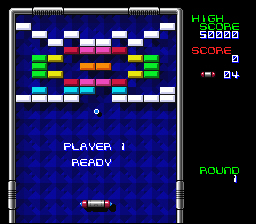
A fully playable Breakout clone — ball, paddle, bricks, levels, score, and shadows. This is the "put it all together" example. If you can follow this one, you can make a game.
| Button | Action |
|---|---|
| D-Pad Left/Right | Move paddle |
| A (hold) | Move faster |
| Start | Begin; pause during play; after GAME OVER, a new game |
| Any button | Continue after losing a ball |
Then open breakout.sfc in your emulator (Mesen2 recommended).
The very first thing the game does is kill the display:
Why force blank? Outside of VBlank, the PPU owns the VRAM bus for rendering. Writes during active display are silently ignored — not queued, not buffered, just gone. Setting bit 7 of INIDISP shuts off the renderer entirely. Now you can DMA as much as you want without racing the clock.
Here's where it gets interesting. This game's VRAM layout has an intentional overlap:
BG1's tilemap is 32x32 entries but the game only uses the top 16 rows. Rows 16-31 (addresses $0400-$07FF) sit there unused — so we slide BG3's tilemap right into that gap. Free 1 KB of VRAM, no catch.
Well... one catch:
The pink flash incident. During the port, level transitions showed a single frame of garbled colors. The culprit? BG1 and BG3 tilemaps were uploaded in separate VBlanks. The frame between them had BG3 half-overwritten by BG1. Fix: both transfers in the same VBlank, always.
That's ~4 KB in one VBlank. Tight, but PVSnesLib routinely does 4.5 KB+. It works.
Bricks get destroyed. Score changes. Colors cycle each level. You can't modify ROM, so you copy everything to RAM and work on the copies:
Why are these in data.asm instead of C? They're big — 2 KB each. If you declared them as C static arrays, the compiler would place them around $00A0, which crashes into the OAM buffer at $0300-$051F. In assembly, we pin them to $0800 with .RAMSECTION ... ORGA $0800 FORCE. Problem solved.
The SNES gives you 128 sprites. A full brick wall has 100 bricks. You could use sprites, but you'd blow most of your budget on rectangles that don't even move.
The much better approach: bricks are background tiles. Each brick is 2 tiles wide (16 pixels), and the palette number encodes its color:
Destroying a brick? Write zeroes (transparent tile), DMA the tilemap, done:
One frame later the brick is gone. No sprite management, no flicker, no limits.
Instead of checking every brick against the ball, convert the ball's pixel position to grid coordinates and look up the single cell it's in:
65816 trick: by * 10 is written as (by << 3) + (by << 1) — that's by*8 + by*2. A shift is 2 cycles. A software multiply is ~50. On this CPU, you learn to love bit shifts real fast.
If blocks[b] != 8, there's a brick there. One array lookup instead of 100 comparisons.
Where the ball hits the paddle determines the bounce angle. Four zones, 7 pixels each:
This is what makes Breakout feel like Breakout. Without it, the ball just bounces at the same angle every time and the game plays itself.
Every visible sprite has a shadow twin: same shape, darker palette, offset a few pixels down-right, drawn at a lower priority. Sprites are positioned via direct oamMemory[] writes instead of oamSet() to avoid the 158-byte stack frame overhead per call (10 sprites per frame would cause visible slowdown):
It costs 5 extra sprites (one per visible piece), but the result looks surprisingly polished for something so simple.
What's tile | 256? Sprite tiles live at VRAM $2000 (the secondary name table, selected by REG_OBJSEL = 0x00). Bit 8 of the tile number picks this table. Without it, the PPU looks for tiles at $0000 — which is your tilemap. You'll get garbage sprites and spend an hour debugging before you remember this bit.
Each new level swaps CGRAM colors 8-15 with one of 7 pre-made color sets:
Same tiles, same tilemap, completely different look. This is why the SNES palette system is so powerful — recoloring is essentially free.
One iteration per frame, clean and predictable:
Note that we read pad_keys[0] directly — not through padPressed(). This is the raw buffer that the NMI handler fills every frame. Sometimes the simple way is the right way.
data.asm serves two purposes in Breakout:
1. ROM asset storage — tile data, tilemaps, and palettes are pre-converted binary files included via .INCBIN:
SUPERFREE lets the linker place each section in any ROM bank with space. A typical game has 10-30 KB of tile data — far too much for a single bank.
2. Pinned RAM buffers — the writable tilemap copies need specific addresses:
ORGA $0800 FORCE pins the buffer at exactly address $0800 in bank $7E WRAM. This is necessary because the game modifies tilemaps at runtime (destroying bricks, cycling colors), and C arrays can't be reliably placed at specific addresses.
Why not just use C arrays? Two problems. First, the compiler places C arrays in low WRAM ($0000-$01FF range), which collides with the OAM buffer at $0300. Second, for overlapping VRAM regions (BG1 and BG3 share $0400-$07FF), you need precise control over DMA source addresses — assembly gives you that control.
The res/ folder contains .dat files — raw binary data ready for DMA to VRAM. These were originally converted from PVSnesLib's asset pipeline. No gfx4snes step in the Makefile because the conversion was done once, offline, and the results checked into the repository.
For a new game, you'd typically add a gfx4snes rule:
This tells make/common.mk to run gfx4snes on each PNG, producing .pic (tiles), .pal (palette), and .map (tilemap) files.
| Module | Why it's here |
|---|---|
| console | PPU init, NMI handler, WaitForVBlank() |
| sprite | OAM buffer for ball, paddle, and drop shadows (10 sprites total) |
| dma | dmaCopyVram() for tilemap uploads, dmaCopyCGram() for palette, OAM DMA |
| background | bgSetMapPtr() for configuring BG1/BG3 tilemap addresses |
| input | Joypad buffers — though Breakout reads pad_keys[0] directly |
console, sprite, dma, background, input (LIB_MODULES in the Makefile).
| Register | Address | Role in this example |
|---|---|---|
| INIDISP | $2100 | Force blank during initial load |
| BGMODE | $2105 | Mode 1 (BG1 4bpp, BG3 2bpp) |
| BG1SC | $2107 | BG1 tilemap at $0000 |
| BG3SC | $2109 | BG3 tilemap at $0400 |
| BG12NBA | $210B | BG1 tile data at $1000 |
| BG34NBA | $210C | BG3 tile data at $2000 |
| TM | $212C | Enable OBJ + BG3 + BG1 (0x15) |
| OBJSEL | $2101 | 8x8 sprites, secondary name table at $2000 |
| File | What's in it |
|---|---|
| main.c | All game logic (~770 lines) |
| data.asm | RAM buffers at $0800, string constants, asset includes |
| res/tiles1.dat | BG tiles: borders, bricks, font |
| res/tiles2.dat | Sprite tiles: ball, paddle, shadows |
| res/bg1map.dat | Playfield tilemap |
| res/bg2map.dat | 4 background patterns (one per level, 2 KB each) |
| res/palette.dat | Full 256-color palette |
| res/backpal.dat | 7 color sets for level cycling |
| Makefile | LIB_MODULES := console sprite dma background input |
 1.16.1