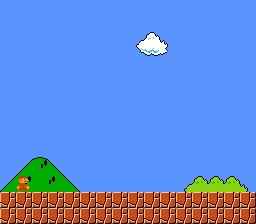
Additive blending between two background layers: a static landscape with semi-transparent clouds scrolling over it. No input required.
Build & Run
Then open transparency.sfc in your emulator (Mesen2 recommended).
Controls
No interactive controls. The clouds scroll automatically.
What You'll Learn
- How the SNES color math unit blends layers using CGWSEL and CGADSUB registers
- The difference between main screen and sub screen layer assignment
- How Mode 1 with BG3 priority high creates an overlay layer
- Mixing 4bpp (BG1) and 2bpp (BG3) tile formats in the same mode
- Using an assembly DMA loader for SUPERFREE graphics data with correct bank bytes
SNES Concepts
Color Math: Main Screen + Sub Screen
The SNES PPU can blend two images together using its color math unit. The "main screen" is the final displayed image. The "sub screen" is a second, hidden rendering of selected layers whose pixel colors are used as the blend source.
In this example:
- Main screen: BG1 (landscape) + BG3 (clouds) – both visible
- Sub screen: BG3 (clouds) – provides the color values for blending
The color math unit takes each main screen pixel and adds the corresponding sub screen pixel color to it. Where clouds overlap the landscape, the cloud colors brighten the landscape beneath them. Where there are no cloud pixels, no addition occurs.
Mode 1 with BG3 Priority High
Mode 1 normally draws BG3 (2bpp) behind BG1 (4bpp). Setting BG3_MODE1_PRIORITY_HIGH promotes BG3's high-priority tiles above all other BG layers, which is essential for the cloud overlay to render on top of the landscape.
Color Math Configuration
The COLORMATH_BACKDROP flag ensures clouds also blend over empty areas (CGRAM entry 0).
Assembly DMA Loader
The tile data, tilemaps, and palettes live in SUPERFREE ROM sections that may land in any bank. C code cannot reliably specify bank bytes for cross-bank data, so data.asm provides a loadGraphics() routine that uses the :label syntax to get linker-resolved bank bytes at link time. All graphics are loaded during forced blank (screen off) since the total data exceeds the ~4KB VBlank DMA budget.
Walkthrough
Setup
consoleInit()initializes the PPU and NMI handler- Force blank (
REG_INIDISP = 0x80) allows unlimited VRAM write time loadGraphics()DMAs all tile/tilemap/palette data to VRAM and CGRAM- BG1 tilemap at VRAM
$2000, tiles at$0000(4bpp landscape) - BG3 tilemap at VRAM
$2400, tiles at$1000(2bpp clouds) - Main screen, sub screen, and color math are configured
- Screen is turned on
Main Loop
Each frame, BG3's horizontal scroll is incremented by one pixel. The tilemap wraps naturally, creating seamless looping clouds:
bgSetScroll() defers the actual PPU register write to the NMI handler via a dirty-flag mechanism, ensuring scroll updates happen safely during VBlank.
Files
| File | Purpose |
|---|---|
main.c | PPU setup, color math configuration, scroll loop |
data.asm | Assembly DMA loader + SUPERFREE graphics data |
Makefile | Build config, gfx4snes conversion rules |
res/backgrounds.bmp | 4bpp landscape source image |
res/clouds.bmp | 2bpp cloud overlay source image |
What's Next?
Window Masking: Window Example - Triangle-shaped HDMA window
HDMA Gradient: Gradient Colors - Per-scanline color effects
