 |
OpenSNES
Modern Open-Source SNES Development SDK
|
|
OpenSNES
Modern Open-Source SNES Development SDK
|
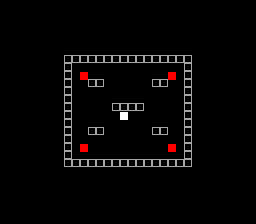
AABB sprite-vs-sprite and tile-based wall collision in a walled arena. Move the white square with the D-pad. Overlapping a red enemy turns both green.
| Button | Action |
|---|---|
| D-Pad | Move player sprite (2 pixels/frame) |
Then open collision_demo.sfc in your emulator (Mesen2 recommended).
collideRect() takes two Rect* pointers and returns non-zero if the rectangles overlap. The Rect struct holds x, y, width, and height fields:
The example checks the player against four static enemy sprites each frame, storing results in a bitmask (collision_flags). Bit N set means enemy N is overlapping.
collideTile() takes four parameters: a pixel X coordinate, a pixel Y coordinate, a pointer to the collision map array, and the map width in tiles:
It converts the pixel position to a tile index (dividing by 8) and returns the tile value – 1 for solid, 0 for passable. The example checks all four corners of the player's 8x8 bounding box to detect wall overlap.
When a diagonal movement would collide, each axis is tested independently. If only the X component collides, the Y movement still applies (and vice versa). This lets the player slide along walls:
Instead of calling oamSet() (which has a 158-byte stack frame per call), the example writes sprite data directly into the OAM buffer. Each sprite is 4 bytes: X low, Y, tile number, and attribute byte (priority + palette bank):
When a collision is active, the palette bank switches from 0 (normal colors: white player, red enemies) to 1 (green highlight for both), providing instant visual feedback.
The arena is a 16x14 tile grid (128x112 pixels) centered on the 256x224 screen. Walls form the border with symmetric internal platforms:
The same data drives both the visual BG tilemap (drawn once at init) and the runtime collision checks (read every frame).
console, input, sprite, dma, collision, background (LIB_MODULES in the Makefile).
| File | Purpose |
|---|---|
| main.c | Collision logic, sprite management, game loop |
| Makefile | Build config (LIB_MODULES := console input sprite dma collision background) |
Game: Breakout - Complete game with collision, sprites, and levels
 1.16.1