Screenshot
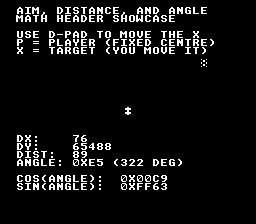
Live demonstration of the four math primitives a 2D action game leans on the most: sqrt16 (pixel distance), atan2_8 (8-bit angle to a target), and the fixCos / fixSin LUTs (project a velocity vector along that angle). Everything updates live as the user moves the target with the D-pad — the numbers on screen are real arithmetic, not pre-baked.
A security turret sits on a roof at the screen centre; the drone it aims at follows the D-pad. Each frame the example recomputes dx/dy from the two centres, calls sqrt16(dx² + dy²) for the pixel distance, calls atan2_8(dy, dx) for the 8-bit angle, then calls fixCos and fixSin on that angle to read back the unit direction vector — and turns the turret to face the drone with the same angle.
A second drone, its eye cyan, orbits the roof on its own: the motion half of the fixed-point story (it was the fix32_orbit example).
SNES Concepts
- <snes/math.h> square-root and atan2:
- sqrt16(n) → integer floor of √n, range 0–255
- atan2_8(dy, dx) → 8-bit angle in the same convention as the fixSin / fixCos LUTs (0 = +X, 64 = +Y, 128 = −X, 192 = −Y)
- LUT chaining — feed the atan2_8 output back into the trig LUT to recover a unit direction vector that points from the turret to the drone. This is the canonical pattern for projectile aiming, pursuit AI, and any "rotate sprite to face X" code.
- Facing a target with no rotation hardware — the turret is drawn in sixteen headings, a sixteenth of a turn (16 angle steps) apart, and the angle picks the frame: (angle + 8) >> 4, half a step added so that the NEAREST heading wins, not the one just below.
- Mode 0 + sprite overlay — BG1 hosts the text via the text module, BG2 the roof (2bpp, its own four colours at CGRAM 32: in Mode 0 each BG has its own palettes), in front-to-back order BG1, BG2. The turret and the drones are 32×32 OBJ sprites over both. Sprite tiles are placed at VRAM $4000 to keep $0000 free for the text font; the sheet holds 264 tiles, so the drones sit in the second OBJ name table (tiles 256, 260).
- A sprite's position is its top-left corner. The example keeps the centres — what the maths aims between — and draws each 32×32 sprite 16 pixels up and left of its centre.
- <snes/fixed32.h> motion, the orbiter — keep the world in 16.16 and the screen in 8.8:
- an angle accumulator in 16.16 (fixed32), advanced each frame by a 16.16 angular velocity (FIX32(1): one LUT step a frame)
- its integer part (UNFIX32) indexes the 256-step LUT
- the position is fix32Mul(radius, fix32Cos(angle)) and the same with fix32Sin, around (128, 96) at 60 px, and only the final screen position is narrowed to integers
What to Observe
The live readout panel updates every frame:
- DX / DY — signed distances from the turret to the drone (the text module prints a u16: the example writes the sign, then the magnitude)
- DIST — sqrt16(dx² + dy²) in pixels (0–255)
- ANGLE — 8-bit angle from the turret to the drone (hex), with the equivalent in degrees in parentheses (≈ angle × 360 / 256)
- COS / SIN — 8.8 fixed-point components of the unit direction vector. Their values match the angle: at ANGLE = 0x40 (90°, target straight south on a SNES screen) you see COS = 0x0000 and SIN = 0x0100.
Fly the drone around with the D-pad and watch the entire panel react in real time, the turret's barrel following. The cyan drone circles at one LUT step a frame (an orbit in about 4.3 s at 60 Hz), whether you move or not; it crosses the text, as sprites do over a background.
How to Build
make -C examples/basics/aim_target
The ROM lands at examples/basics/aim_target/aim_target.sfc.
Assets
res/units.png — the turret's sixteen headings (OBJ palette 0), the security drone (palette 1) and its cyan twin (palette 2); res/roof.png — the roof, four colours. The turret and the roof are drawn by devtools/art_assets/build.py (turret, aim_sprites, rooftop), the drone is Néo-Lumen art (PixelLab, CC0; assets/neo-lumen/README.md). The build converts both from the settings file beside each (opensnes-sprite, opensnes-tileset).
Modules Used
console, sprite, dma, background, text, input, gameloop, math.
Also linked: fixed32 — 32-bit fixed point (fix32*).
See also

 1.16.1