 |
OpenSNES
Modern Open-Source SNES Development SDK
|
|
OpenSNES
Modern Open-Source SNES Development SDK
|
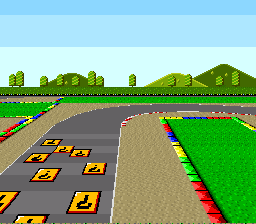
How to combine Mode 7 with HDMA to create a perspective ground plane – the same technique used in F-Zero, Mario Kart, and Pilotwings. The screen is split in two: a static sky on top and a scaled ground that recedes into the distance.
Read mode7/rotate_scale first (Mode 7 basics), then hdma/hdma_wave (HDMA tables written per scanline).
| Button | Action |
|---|---|
| D-PAD | Scroll the ground plane |
Then run perspective.sfc in luna (opensnes run) or any SNES emulator.
The screen is divided by 4 HDMA channels running every frame:
| Channel | Target | Effect |
|---|---|---|
| Ch1 | BGMODE ($2105) | Switches from Mode 1 (sky) to Mode 7 (ground) |
| Ch2 | TM ($212C) | Switches from BG2 (sky tiles) to BG1 (Mode 7 ground) |
| Ch3 | M7A ($211B) | Per-scanline horizontal scale (perspective) |
| Ch4 | M7D ($211E) | Per-scanline vertical scale (perspective) |
Top 96 scanlines: Mode 1 displays the sky on BG2. The lines below: Mode 7 displays the ground with per-scanline scaling.
The four tables are set up once with hdmaSetup(): the hardware reads each from its start again at the top of every frame.
The key to the 3D illusion: scanlines near the top of the ground area (the "horizon") use a large scale value (small objects = far away), while scanlines near the bottom use a small scale value (large objects = close up).
Two pre-computed tables in main.c, perspective_x and perspective_y, give each ground scanline its own M7A and M7D.
mode7SetScroll() and mode7SetCenter() write the registers at once, so they run right after WaitForVBlank().
The SNES allows changing the BGMODE register ($2105) via HDMA between scanlines. This is how one screen shows two completely different video modes – Mode 1 for the sky portion and Mode 7 for the ground portion. The switch happens during HBlank, so there is no visible glitch.
By writing M7A/M7D on every scanline (HDMA repeat mode: a new value each line), each horizontal line of the ground has a different scale factor. Lines near the horizon are scaled way down (far away), lines at the bottom are close to 1:1 (nearby). This creates the depth illusion without any 3D math at runtime – it is all pre-computed tables.
HDMA takes its time from the CPU on every line where a channel is active: about 18 master cycles, plus 8 per active channel and 8 per byte written (anomie's register notes; at most 466 master cycles a line, all eight channels on). Here, on a ground line: 18 + 4 x 8 + 4 bytes x 8 = 82 master cycles of the 1364 a scanline lasts.
| File | Purpose |
|---|---|
| main.c | The HDMA tables, their setup, input and the camera |
| res/ground.png.toml, res/sky.png.toml | the import settings of the ground (Mode 7) and the sky (opensnes-tileset); the build converts and links them |
| res/ground.png | the city from above, 1024x1024 in 235 tiles (CC0, assets/neo-lumen/) |
| res/sky.png | the towers over the horizon, 512x256; its 16 colours are the ground's first sixteen, the palette both read (devtools/art_assets/mode7.py writes the two) |
| Makefile | LIB_MODULES := console dma background sprite input mode7 hdma |
console, dma, background, sprite, input, mode7, hdma (LIB_MODULES in the Makefile).
 1.16.1